In my recent posts, I described how to build a continuous deployment (CD) pipeline step by step using PowerShell. Among other things, I demonstrated how to deploy projects and update parameters:
- https://www.flip-design.de/?p=1687
- https://www.flip-design.de/?p=1588
- https://www.flip-design.de/?p=1563
When deploying to different environments, data source connections often need to be adjusted as well. For example, a report in the test environment should connect to the test database.
Native deployment pipelines support these adjustments through deployment rules. Alternatively, the data sources of a semantic model can be updated using a PowerShell script and a REST API call.
The screenshots below first show how to find a gateway connection that points to a previous server or a development server.
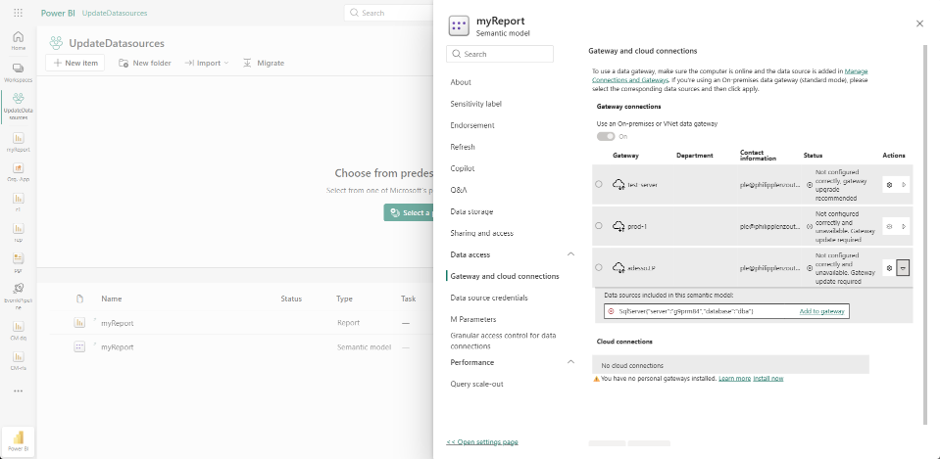
After the script has been executed, the semantic model points to a different database that is also accessible through the gateway:

The script is fairly straightforward, so I’m sharing it here:
# Specify the current database to match and the replacement database to use.
param (
    [Parameter(Mandatory = $true)]
    [ValidateNotNullOrEmpty()]
    [string]$oldDatabase,

    [Parameter(Mandatory = $true)]
    [ValidateNotNullOrEmpty()]
    [string]$newDatabase
)

# Configure the service principal credentials used to authenticate with Power BI.
$tenantId = "dd31239f-1fba-49a4-8b6c-47df999883d6"
$clientId = "b705d1ab-0a03-4c29-8c42-d6e5d9f5808f"
$clientSecret = ConvertTo-SecureString "XXXXXXXXXX" -AsPlainText -Force

# Sign in using the service principal's client ID and client secret.
$credential = [System.Management.Automation.PSCredential]::new($clientId, $clientSecret)
Connect-PowerBIServiceAccount -ServicePrincipal -Tenant $tenantId -Credential $credential -ErrorAction Stop | Out-Null

# Identify the workspace and semantic model whose data source should be updated.
$workspaceId = "f2558832-a956-45b8-be5c-de8e884419ee"
$datasetId   = "c920dfda-0516-40a5-8647-8a63ad660305"

# Keep the SQL Server unchanged while switching the database.
$server      = "G9PRM84"

# Build the request body: match the existing SQL connection and provide its replacement.
$body = @{
    updateDetails = @(
        @{
            datasourceSelector = @{
                datasourceType = "Sql"
                connectionDetails = @{
                    server   = $server
                    database = $oldDatabase
                }
            }
            connectionDetails = @{
                server   = $server
                database = $newDatabase
            }
        }
    )
} | ConvertTo-Json -Depth 10

# Transfer semantic model ownership to the signed-in service principal.
Invoke-PowerBIRestMethod `
    -Url "groups/$workspaceId/datasets/$datasetId/Default.TakeOver" `
    -Method Post `
    -ErrorAction Stop

# Apply the new database connection details to the matching data source.
Invoke-PowerBIRestMethod `
    -Url "groups/$workspaceId/datasets/$datasetId/Default.UpdateDatasources" `
    -Method Post `
    -Body $body `
    -ErrorAction Stop