In this post, I’ll briefly demonstrate how to trigger a deployment pipeline in Microsoft Fabric using PowerShell. The deployment requires the IDs of the source and target stages—for example, when deploying from Test to Production. I’ve adapted the script so that only the source stage number needs to be specified. The script automatically retrieves the corresponding IDs and uses the next stage as the target. This simplifies configuration and deployment.
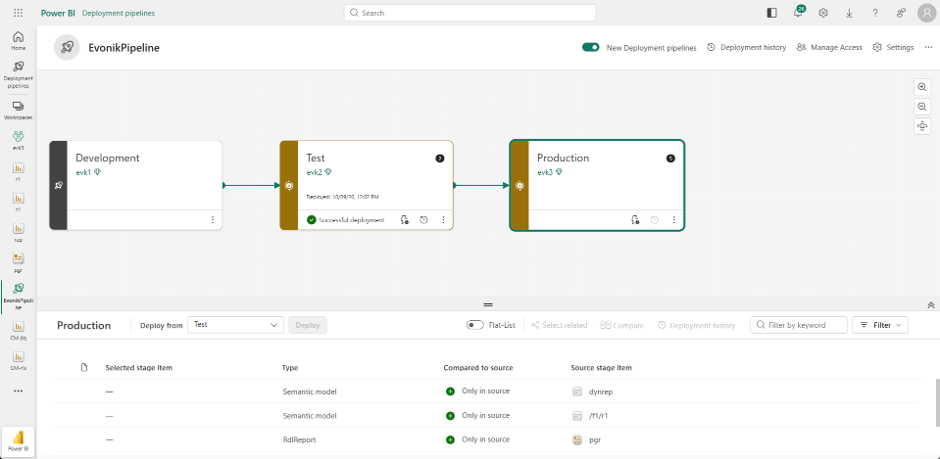
The following screenshot shows a deployment pipeline with three stages. The pipeline ID can be found in its URL. This ID is required to trigger the deployment through the script.
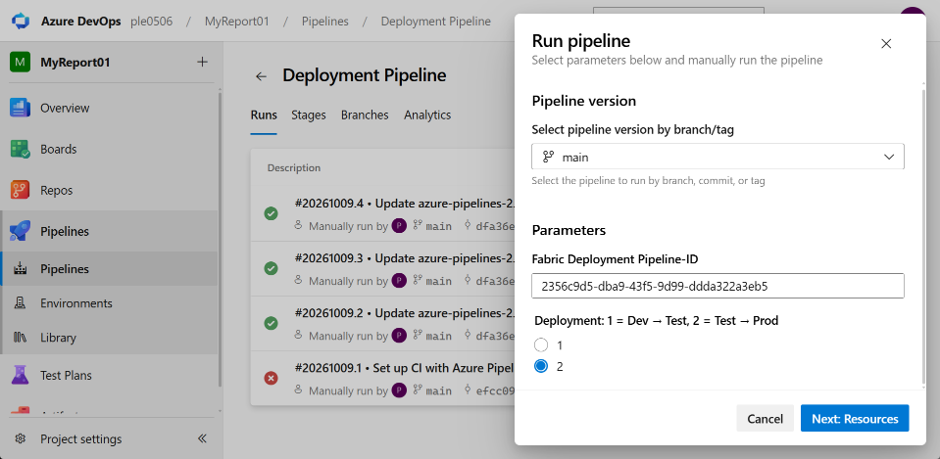
I’ve also created a YAML pipeline in Azure DevOps that runs the PowerShell script. The configuration of this YAML pipeline is outside the scope of this post. A parameter makes it easy to select the source stage: for example, specifying 1 deploys from Development to Test, while specifying 2 deploys from Test to Production.
Here is the script:
<#
.SYNOPSIS
    Starts a deployment between two consecutive Fabric pipeline stages.

.DESCRIPTION
    Authenticates using a service principal and retrieves the stages
    of the specified deployment pipeline.

    Stages are sorted by their pipeline order. The Stage parameter
    selects the source stage using a one-based position.
    The next stage in the sorted list is used as the target.

    The actual stage IDs are retrieved automatically and passed
    to the deployment API.

    The script starts the deployment but does not wait for completion.

.PARAMETER TenantId
    Microsoft Entra tenant ID.

.PARAMETER ClientId
    Application (client) ID of the service principal.

.PARAMETER ClientSecret
    Client secret used to authenticate the service principal.
    When running in a pipeline, supply this value from a secret variable.

.PARAMETER PipelineId
    ID of the Fabric deployment pipeline.

.PARAMETER Stage
    One-based position of the source stage. Defaults to 1.

    For a pipeline with Development, Test, and Production stages:
    1 deploys from Development to Test.
    2 deploys from Test to Production.

    The final stage cannot be selected as the source because
    it has no subsequent target stage.

.EXAMPLE
    $parameters = @{
        TenantId     = "<tenant-id>"
        ClientId     = "<client-id>"
        ClientSecret = $env:FABRIC_CLIENT_SECRET
        PipelineId   = "<pipeline-id>"
        Stage        = 1
    }

    .\Deploy-FabricPipeline.ps1 @parameters

    Starts a deployment from the first stage to the second stage.
#>

param(
    [Parameter(Mandatory = $true)]
    [ValidateNotNullOrEmpty()]
    [string]$TenantId,

    [Parameter(Mandatory = $true)]
    [ValidateNotNullOrEmpty()]
    [string]$ClientId,

    [Parameter(Mandatory = $true)]
    [ValidateNotNullOrEmpty()]
    [string]$ClientSecret,

    [Parameter(Mandatory = $true)]
    [ValidateNotNullOrEmpty()]
    [string]$PipelineId,

    [ValidateRange(1, 9)]
    [int]$Stage = 1
)

# Stop script execution if an operation fails.
$ErrorActionPreference = "Stop"

# Authenticate using the OAuth 2.0 client credentials flow.
$tokenParameters = @{
    Method      = "Post"
    Uri         = "https://login.microsoftonline.com/$TenantId/oauth2/v2.0/token"
    ContentType = "application/x-www-form-urlencoded"
    Body        = @{
        grant_type    = "client_credentials"
        client_id     = $ClientId
        client_secret = $ClientSecret
        scope         = "https://api.fabric.microsoft.com/.default"
    }
}

$token = Invoke-RestMethod @tokenParameters

# Prepare the authorization header and deployment pipeline URL.
$headers = @{
    Authorization = "Bearer $($token.access_token)"
}

$url = "https://api.fabric.microsoft.com/v1/deploymentPipelines/$PipelineId"

# Retrieve all stages and sort them by their pipeline order.
$result = Invoke-RestMethod -Method Get -Uri "$url/stages" -Headers $headers
$stages = @($result.value | Sort-Object -Property order)

# Verify that the selected source stage has a subsequent target stage.
if ($Stage -ge $stages.Count) {
    throw "Source stage position $Stage has no subsequent target stage. The pipeline contains $($stages.Count) stage(s)."
}

# Convert the one-based source position to a zero-based array index.
# The next array element represents the target stage.
$source = $stages[$Stage - 1]
$target = $stages[$Stage]

# Build the request body using the actual stage IDs.
$body = @{
    sourceStageId = $source.id
    targetStageId = $target.id
} | ConvertTo-Json

# Submit the deployment request.
$deploymentParameters = @{
    Method      = "Post"
    Uri         = "$url/deploy"
    Headers     = $headers
    ContentType = "application/json"
    Body        = $body
}

Invoke-RestMethod @deploymentParameters

# Report that the request was submitted, not that deployment has completed.
Write-Host "Deployment started: $($source.displayName) -> $($target.displayName)"