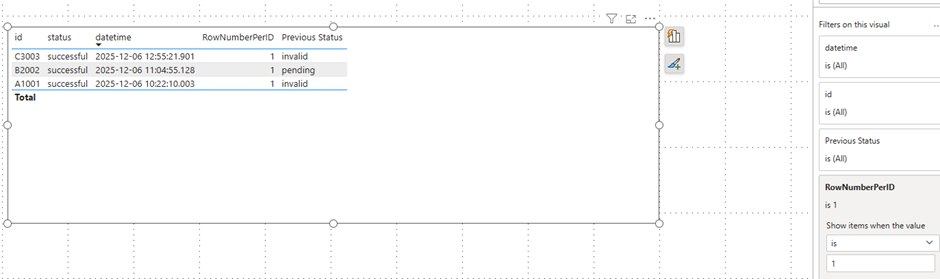
The initial situation was that the data was being read live from a streaming database. Each record had a current status, and the records could be grouped by product. Now I only want to see the latest record, but also have the previous status displayed in the row. Calculated columns are not an option because the data is being retrieved live. Therefore, this has to be solved using measures.
I’d like to show you how this works in this post.
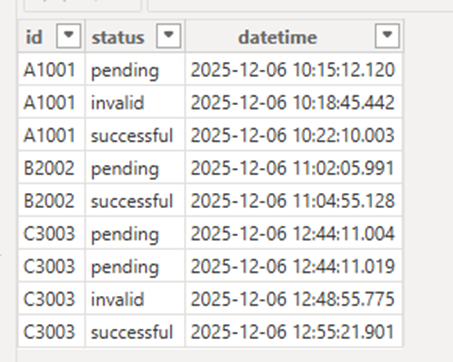
Here is my example data:
If I now visualize the data and sort it by date, it looks like this:
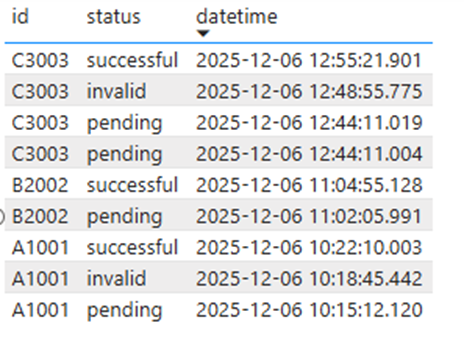
For example, for ID C003, this would mean that the previous status in the first line should be displayed as invalid.
As a first step, I created a measure that displays the row number for the respective data record:
RowNumberPerID =
VAR CurrentDateTime =
    SELECTEDVALUE ( data[datetime] )
VAR CurrentID =
    SELECTEDVALUE ( data[id] )
RETURN
CALCULATE (
    COUNTROWS ( data ),
    FILTER (
        ALL ( data ),
        data[id] = CurrentID
            && data[datetime] >= CurrentDateTime
    )
)
The line number is sorted in such a way that the last record is assigned a 1. This is necessary for later display.
This metric generates an additional ID in the window for each ID:
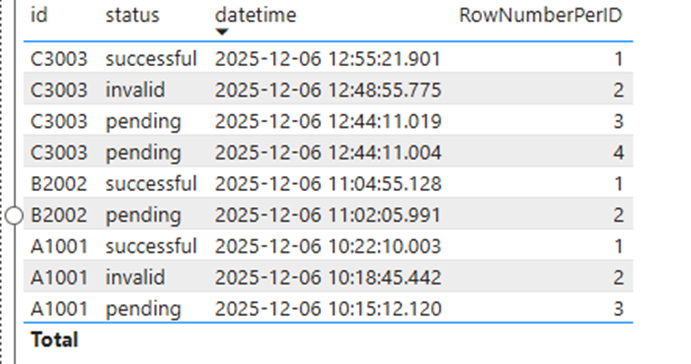
So, essentially, this is classic windowing, similar to what you might know from SQL Server with the PARTITION_BY command.
Next, the actual metric is needed. While it doesn’t require the previous measure to determine the status, doing so makes it easier to visualize the actual process and filter the results.
Previous Status =
VAR CurrentId =
    SELECTEDVALUE ( data[id] )
VAR CurrentDateTime =
    SELECTEDVALUE ( data[datetime] )
VAR PrevDateTime =
    CALCULATE (
        MAX ( data[datetime] ),
        FILTER (
            ALL ( data ),
            data[id] = CurrentId
                && data[datetime] < CurrentDateTime
        )
    )
RETURN
CALCULATE (
    MAX ( data[status] ),
    FILTER (
        ALL ( data ),
        data[id] = CurrentId
            && data[datetime] = PrevDateTime
    )
)
Using this metric, the previous data record is searched for based on the date, and the status is extracted. This then leads to the following:
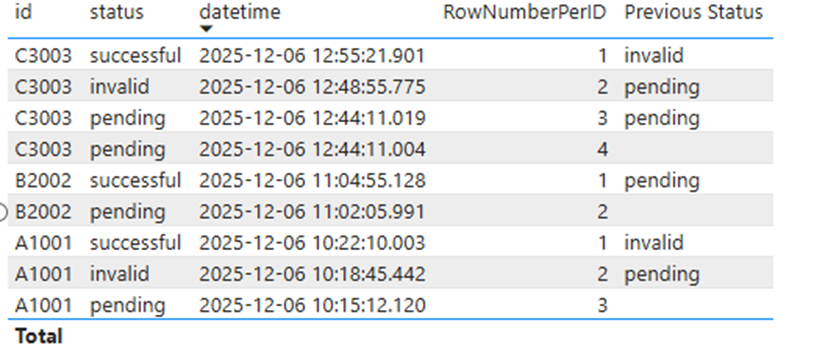
Now a filter can be applied to the visual to display only the last record in a table: